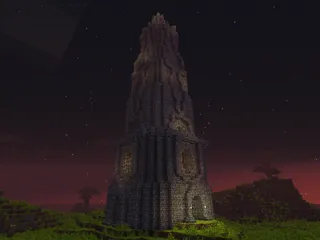
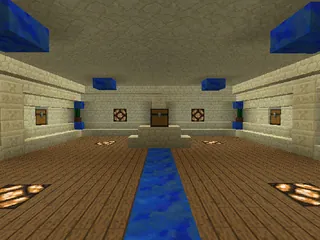
Features
Custom Sounds!
Animated Textures!
Textures from Voxel Deep Space and Painterly!
Months of Work on Building and Details!
Challenging Jumping Sections!
Collectables!
Close-Quarters Combat!
Sewers!
Entire map is interactive! No wasted space here! </ul>
Vault 711
It has been nearly 600 years since the vault doors were sealed against the cataclysm on the surface. With food and supplies running low, you and your friends must find a way to escape the vault and make it to the surface. But be careful, not all dangers lay beyond the doors...
Hand-Built
All of the custom sounds were edited by MrHazardous (samples from freesound.org and credited users), and all of the building was done by hand, block-by-block. Dardar and MrHazardous were the two main builders and we got help from Gar & Avynn. We play-tested this map extensively to make sure it was playable all the way through, designing it to be difficult with minimal frustration. Hours were spent fixing bugs and tweaking the map. We payed very close attention to detail and game-play. We really hope you enjoy it!
Download
MediaFire (http://www.mediafire.com/?d8nshareiimmqav) Note: Recommended 2 players but 1-4 works.
Installation
[minecraft 1.6.2 recommended]
How to install:
(You can find out how to find the .minecraft folder in the "The Resource (texture) Pack:" section below)
The Map:
A. Single Player
1. Drag Vault711MAP into the .minecraft>saves folder. Vault711MAP is in the Vault711_ZIP.zip you downloaded.
B. Server Host
1. Set up a server (Google how).
2. Open the server folder and drag Vault711MAP (Vault711MAP is in the Vault711_ZIP.zip you downloaded) in there.
3. Set the server properties to these recommended settings:
#Minecraft server properties
#Sat Aug 24 12:44:54 PDT 2013
generator-settings=
op-permission-level=4
allow-nether=true
level-name=Vault711MAP
enable-query=false
allow-flight=true
server-port=25566
level-type=DEFAULT
enable-rcon=false
force-gamemode=false
level-seed=protien
server-ip=192.168.x.x (PUT YOUR INTERNAL IP ON THIS LINE)
max-build-height=256
spawn-npcs=true
white-list=false
spawn-animals=true
hardcore=false
snooper-enabled=true
texture-pack=
online-mode=true
pvp=true
difficulty=0
enable-command-block=true
gamemode=0
max-players=20
spawn-monsters=false
view-distance=10
generate-structures=true
spawn-protection=0
motd=Vault 711 Custom Map![/code]
4. De-op all map players to avoid chat spam from command blocks.
5. Launch the server.jar!
The Resource (texture) Pack:
A. Windows
1. In Minecraft options>Resource Packs>Open resource pack folder a window will pop up
2. Drag the Vault711Resource.zip into the window. (Vault711Resource.zip is in the Vault711_ZIP.zip you downloaded)
3. Close the window and in Minecraft, select the resource pack in the list.
4. Go back to the Minecraft main menu and click on the little globe to the left of the "Options" button. Select "Vault711 (US)"
5. Play!
B. Mac/OS X
1. Open Finder (the blue face icon)
2. Go to your UserNameOrHomeFolderNameHere>Library>Application Support>.minecraft>resourcepacks)
3. Drag the Vault711Resource.zip into the resourcepacks folder. Vault711Resource.zip is in the Vault711_ZIP.zip you downloaded.
4. Close the Finder window and in Minecraft, select the resource pack in the list.
5. Go back to the Minecraft main menu and click on the little globe to the left of the "Options" button. Select "Vault711 (US)"
6. Play!
(If these instructions are wrong, let me know. I did Mac instructions off the top of my head.)
[/spoiler]
F.A.Q.
My frames are low, wat do?
1. If you are the server host, you will most likely not be getting blazing fast fps. Servers use up a lot of your computers "brain" power/CPU so there's usually only a little left for Minecraft.
2. Change your Video Settings. Turn off vSync (unless you know it's better for you), Graphics: Fast, OpenGL: On, Performance: Max FPS, and Particles: Minimal.
3. Close other programs you don't need open.
4. Optimize your computer (if you have to).
http://www.sevenforu...indows-7-a.html The names of items are not changing or the font is too thin?
Find the .minecraft folder. Copy the "saves" folder and servers.dat to your desktop. Delete the .minecraft folder. Relaunch minecraft and close Minecraft when you see the main menu. Move the "saves" folder and servers.dat back into the .minecraft folder. Now play!
Sounds are not working?
Go into options>Resource Packs and select Default then back to "Vault 711". If that didn't work, check your default playback device in Windows Sound settings.
Textures are not working?
If you did not download the texture pack from this thread, you may have downloaded a pack that is not compatible. You may have also downloaded a virus if the site or download (file host) is not trustworthy.
Something in the map is broken?
Let me know!