♫ La La La La La ♫
Uploading/Rendering is disabled. This is a read-only archive of the site.

Tagged minecraft

cryfanix
413 downloads 0 comments
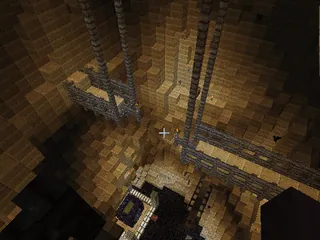
You have miraculously arrived at this neverending desert.You wake up in a small pond facing a Pyramid.You enter the pyramid and discover the journal of Darius.You descend into the depths of the pyramid searching for answers...

IMPORTANT:
PLAY ON ADVENTURE MODE FOR THE BEST EXPERIENCE !
WORKS BEST WITH THIS TEXTURE PACK
http://www.mediafire.com/?59ec5uuhakccwsk

PROTIPS:
    Be very careful,sometimes falling kills.
    Be sure to open every chest to recover Darius' Journal (5 pages)
    Do not break or build anything.The map has been tested. </ul>
    ENJOY ! IF YOU LIKED THE MAP VISIT http://www.youtube.com/user/CryFanixGaming
    THANK YOU
    BlackSun
    412 downloads 2 comments
    BEAST MODE ON KILLING MOBS
    DO YOU WANNA BE A GOD ?
    Come check my map ! The God Mode
    DOWNLOAD NOW !
    Comes with :
    swords
    an amazing arena
    custom mob spawners
    different effect
    Potions
    Unique Armor
    Bows
    Ender Pearls
    Danielx55
    409 downloads 0 comments
    By DanielX5,Andrey,DariusX8
    CptKryptonite
    396 downloads 0 comments
    Welcome to Skyblock 2.0

    This is a little different from regular Skyblock! In this world, you are able to obtain all the resources in the game! But be careful and wise of your decisions, some of the resources are still limited just like regular Skyblock, but at the same time, some resources are unlimited!

    The reason why I say unlimited is because you are able to buy resources with your experience levels whenever you want!
    Save up and buy expensive diamonds or even make a redstone circuit if you feel like it!

    The goal of the Skyblock is very simple. All you have to do obtain the Ender Dragon egg and the Nether Star! You may do whatever you feel like to get these items, whether it be create potions, get diamond armor, enchant your items, and get the best items in the game! Or you may complete these tasks by just simply going YOLO!

    This whole Skyblock adventure is up to you! Enjoy and have fun!

    Rules:

    Never play on peaceful
    No keep inventory gamerule!
    Don't build to the mainland
    Don't jump off the island just to regenerate you health!

    All challenges will be posted in the folder you download or on my website!

    If you have any questions at all, contact me via Youtube or my website! This map is free for you to edit.

    Youtube:
    http://www.youtube.com/CptKryptonite13

    Website:
    http://www.sites.google.com/site/cptkryptonitegaming/home
    Hotel 1.6M
    mega
    391 downloads 0 comments
    This is my hotel.
    MrHazardous
    389 downloads 0 comments
    Features
      Custom Sounds!
      Animated Textures!
      Textures from Voxel Deep Space and Painterly!
      Months of Work on Building and Details!
      Challenging Jumping Sections!
      Collectables!
      Close-Quarters Combat!
      Sewers!
      Entire map is interactive! No wasted space here! </ul>

      Vault 711
      It has been nearly 600 years since the vault doors were sealed against the cataclysm on the surface. With food and supplies running low, you and your friends must find a way to escape the vault and make it to the surface. But be careful, not all dangers lay beyond the doors...

      Hand-Built
      All of the custom sounds were edited by MrHazardous (samples from freesound.org and credited users), and all of the building was done by hand, block-by-block. Dardar and MrHazardous were the two main builders and we got help from Gar & Avynn. We play-tested this map extensively to make sure it was playable all the way through, designing it to be difficult with minimal frustration. Hours were spent fixing bugs and tweaking the map. We payed very close attention to detail and game-play. We really hope you enjoy it!

      Download
      MediaFire (http://www.mediafire.com/?d8nshareiimmqav)
      Note: Recommended 2 players but 1-4 works.

      Installation
      [minecraft 1.6.2 recommended]
      How to install:
      (You can find out how to find the .minecraft folder in the "The Resource (texture) Pack:" section below)

      The Map:
      A. Single Player
      1. Drag Vault711MAP into the .minecraft>saves folder. Vault711MAP is in the Vault711_ZIP.zip you downloaded.

      B. Server Host
      1. Set up a server (Google how).
      2. Open the server folder and drag Vault711MAP (Vault711MAP is in the Vault711_ZIP.zip you downloaded) in there.
      3. Set the server properties to these recommended settings:

      #Minecraft server properties
      #Sat Aug 24 12:44:54 PDT 2013
      generator-settings=
      op-permission-level=4
      allow-nether=true
      level-name=Vault711MAP
      enable-query=false
      allow-flight=true
      server-port=25566
      level-type=DEFAULT
      enable-rcon=false
      force-gamemode=false
      level-seed=protien
      server-ip=192.168.x.x (PUT YOUR INTERNAL IP ON THIS LINE)
      max-build-height=256
      spawn-npcs=true
      white-list=false
      spawn-animals=true
      hardcore=false
      snooper-enabled=true
      texture-pack=
      online-mode=true
      pvp=true
      difficulty=0
      enable-command-block=true
      gamemode=0
      max-players=20
      spawn-monsters=false
      view-distance=10
      generate-structures=true
      spawn-protection=0
      motd=Vault 711 Custom Map![/code]
      4. De-op all map players to avoid chat spam from command blocks.
      5. Launch the server.jar!

      The Resource (texture) Pack:
      A. Windows

      1. In Minecraft options>Resource Packs>Open resource pack folder a window will pop up
      2. Drag the Vault711Resource.zip into the window. (Vault711Resource.zip is in the Vault711_ZIP.zip you downloaded)
      3. Close the window and in Minecraft, select the resource pack in the list.
      4. Go back to the Minecraft main menu and click on the little globe to the left of the "Options" button. Select "Vault711 (US)"
      5. Play!
      B. Mac/OS X

      1. Open Finder (the blue face icon)
      2. Go to your UserNameOrHomeFolderNameHere>Library>Application Support>.minecraft>resourcepacks)
      3. Drag the Vault711Resource.zip into the resourcepacks folder. Vault711Resource.zip is in the Vault711_ZIP.zip you downloaded.
      4. Close the Finder window and in Minecraft, select the resource pack in the list.
      5. Go back to the Minecraft main menu and click on the little globe to the left of the "Options" button. Select "Vault711 (US)"
      6. Play!
      (If these instructions are wrong, let me know. I did Mac instructions off the top of my head.)
      [/spoiler]

      F.A.Q.

      My frames are low, wat do?
      1. If you are the server host, you will most likely not be getting blazing fast fps. Servers use up a lot of your computers "brain" power/CPU so there's usually only a little left for Minecraft.
      2. Change your Video Settings. Turn off vSync (unless you know it's better for you), Graphics: Fast, OpenGL: On, Performance: Max FPS, and Particles: Minimal.
      3. Close other programs you don't need open.
      4. Optimize your computer (if you have to). http://www.sevenforu...indows-7-a.html

      The names of items are not changing or the font is too thin?
      Find the .minecraft folder. Copy the "saves" folder and servers.dat to your desktop. Delete the .minecraft folder. Relaunch minecraft and close Minecraft when you see the main menu. Move the "saves" folder and servers.dat back into the .minecraft folder. Now play!

      Sounds are not working?
      Go into options>Resource Packs and select Default then back to "Vault 711". If that didn't work, check your default playback device in Windows Sound settings.

      Textures are not working?
      If you did not download the texture pack from this thread, you may have downloaded a pack that is not compatible. You may have also downloaded a virus if the site or download (file host) is not trustworthy.

      Something in the map is broken?
      Let me know!
      Talon1017
      383 downloads 2 comments
      In Part 7, we have everything in Pokemon X and Y from Vaniville Town to Ambrette Town and Cyllage City.

      Part 8 adds the Cyllage City Pokemon Gym, Route 10, Geosenge Town (Pre-Flare), Route 11 and the Reflection Cave.

      You will need Command Blocks enabled to fully enjoy this map.
      Recent Comments
      nandeman44 wrote: here is a 1.14.4 version https://drive.google.com/open?... Hey there, what Minecraft folder do I put these files from...
      MakoMemelord about December 2019
      here is a 1.14.4 version https://drive.google.com/open?...
      nandeman44 about November 2019
      This map was such a large part of my childhood! I hope the link will be fixed, this map gives me such amazing nostalgia!
      poiisonoustea about October 2019
      Drin45 wrote: It is simply fascinating! yeah !
      DiGiDiX57 about October 2019
      AttackRacer wrote: elcdragon wrote: Bin am überlegen ob wir einen neuen OnlineServer starten sollen. Gibt es noch Spieler von damals? Suche...
      DiGiDiX57 about September 2019
      It is simply fascinating!
      Drin45 about August 2019
      elcdragon wrote: Bin am überlegen ob wir einen neuen OnlineServer starten sollen. Gibt es noch Spieler von damals? Suche Admins für die...
      AttackRacer about July 2019
      Recent Posts
      haldol and ativan compatible with cogentin factor v leiden and plavix https://www.arenafan.com/ads/list/?where...blets.html
      Bernardger 18 January 2021
      http://(server address)/forum.php?mod=viewt...3974&extra= http://wastedinbombay.com/wib/node/18?page=1046...
      Bernardger 18 January 2021
      The best digital marketing agency is one that is well matched with the consumer, not a 'one size fits all' kind of work. First of all,...
      michaelandersen 13 January 2021
      This game is awesome. Create more maps to give more fun. Thanks. I recommend our appliance repair to fix your appliances.
      scottheflin589 4 January 2021
      It looks like the tutorial is massively outdated, I followed the steps and it's came to the point where it says that my upload for...
      GrokkyHodor 6 December 2020
      ♫ La La La La La ♫ © 2011 MinecraftWorldMap.com. All Rights Reserved.
      Unofficial fan archive of Minecraft World Map (2011-2021) · About · Removal requests
      About | Forums